GenAI-ANA.
UX Strategy, user flows, wireframes, design system components, visuals, and prototype.
Optum.
Summer 2025 to Spring 2026.
Lead Product Designer.
Figma, Figjam, Miro.
1 Product Designer (me), 2 front end react developers, 10 backend developers, 2 Project Managers, 1 Product Owner
Optum was developing an AI powered platform and GenAI Assistant, GenAI-ANA, as part of a research and development project from the Innovation Lab. This system was meant to be utilized by data scientists, clinicians, and researchers within healthcare spaces and the federal government. They had a very rough prototype of the capabilities, but needed interactions and UI to be fully developed into a cohesive user experience. I was brought in as the sole Product Designer embedded on a team of 10 backend developers, 2 front end developers, and the project management team.
Client had a base concept that was working, but it was disjointed how the different modules worked together and it felt more like a website than a real browser-based software. Here I partnered with the primary stakeholder, the Senior Director of Architecture, and the Senior Technical Project Manager to start to define business value and how impact will be measured. I also developed a UX strategy here, defining our challenges, aspirations, focus areas, and guiding principles. This was our North Star that kept the team focused and prevented costly, misguided development.
Partnering with engineering, I identified what issues the team was currently experiencing. A large problem was AI hallucinations. Another was that navigation was difficult, users weren’t able to navigate between modules easily or effectively. This led me to start doing a deep dive on the existing product. Here I started to identify key issues: poor IA (a ribbon menu with dropdowns, a home page taken up by a large hero graphic); no ability for users to directly determine what the gen AI assistant was working with which led to hallucinations; users being unable to pick up where they left off (system status); users not knowing how or even what to do with the system (blank canvas problem / task paralysis).
From here I tackled the first major issues, IA, blank canvas, and system status. Building out a new information architecture where the homepage now displayed a large table of past interactions so users knew the state of them and could easily jump back into where they left off. On the IA side, I shifted the menu to a left column drawer that the users could close. This had all the modules present, so users could easily navigate between sections which reduced confusion on what capabilities of the system were. Further refinement led me to remove the intro / hero section entirely and replace this with the gen AI assistant. Here I implemented nudges and follow-ups which helped to solve the blank canvas problem. These new interactions saw an immediate change in user engagement. What was clunky and difficult to use now felt intuitive. An AI assistant that people didn’t know how to interact with now felt easy to work with. Further interaction refinements were to define how citations would be presented and to give the users the ability to define documents the AI would work with. This helped to increase trust with the system, where it was showing the work done, along with putting up guardrails so that it wouldn’t access outside information, potentially giving users wrong information. This was integral for federal policy researchers and data scientists.
With initial wireframes created, I used the existing Optum design system, Harmony, to develop the finalized visual designs. It was necessary for me to update the system with new AI-specific components and interactions that I developed (nudges, citations, follow-ups, etc.). This helped create a coherent system that still fit in well with the overall Optum brand and family of products.
Conducting interviews with several stakeholders including the Senior Director of Architecture, I determined that we would need some basic chatbot style functionality. We also needed to organize the various components into a cohesive UI and navigation system. The original product had a very "website" feel to it, where users were visiting various webpages. It did not have a real software look, either by navigation or in its separate components. Due to project constraints, we relied on stakeholder proxy interviews and planned to validate with end-users in v2.
To help guide the work I created a simple UX strategy outlining what the challenges are, what we want the product to do, and how we can measure success. This was our North Star that kept the team focused and prevented costly, misguided development.
Challenges
|
|||
Aspirations
|
Focus areas
|
Guiding principles
|
Activities
|
MeasurementsProject in development; metrics are targets for v1 launch.
|
|||
"Navigation is clunky. How do I find certain components?"
"Users work with a lot of documents, but the chatbot interactions never reference where it is getting information. How do they know it isn't hallucinating?"
"Users need a document library to store everything they upload and to be able to reference."
Working with stakeholders and subject matter experts at Optum through interviews and finding out integral pain points, I started creating a basic main page and UI templates for the AI application. We built this on React, and I leveraged an existing Optum design system, Harmony, that not only sped up development but we could keep a single source of truth while keeping the Optum branding. One key takeaway was that users would be doing heavy amounts of research. As such, users would need to not only select what was being referenced, but also require the GenAI Assistant to show citations. It was necessary for users to be able to see their histories, and be able to go back to prior conversations or processes quickly and pick up where they left off, adding to them or remixing them as needed.
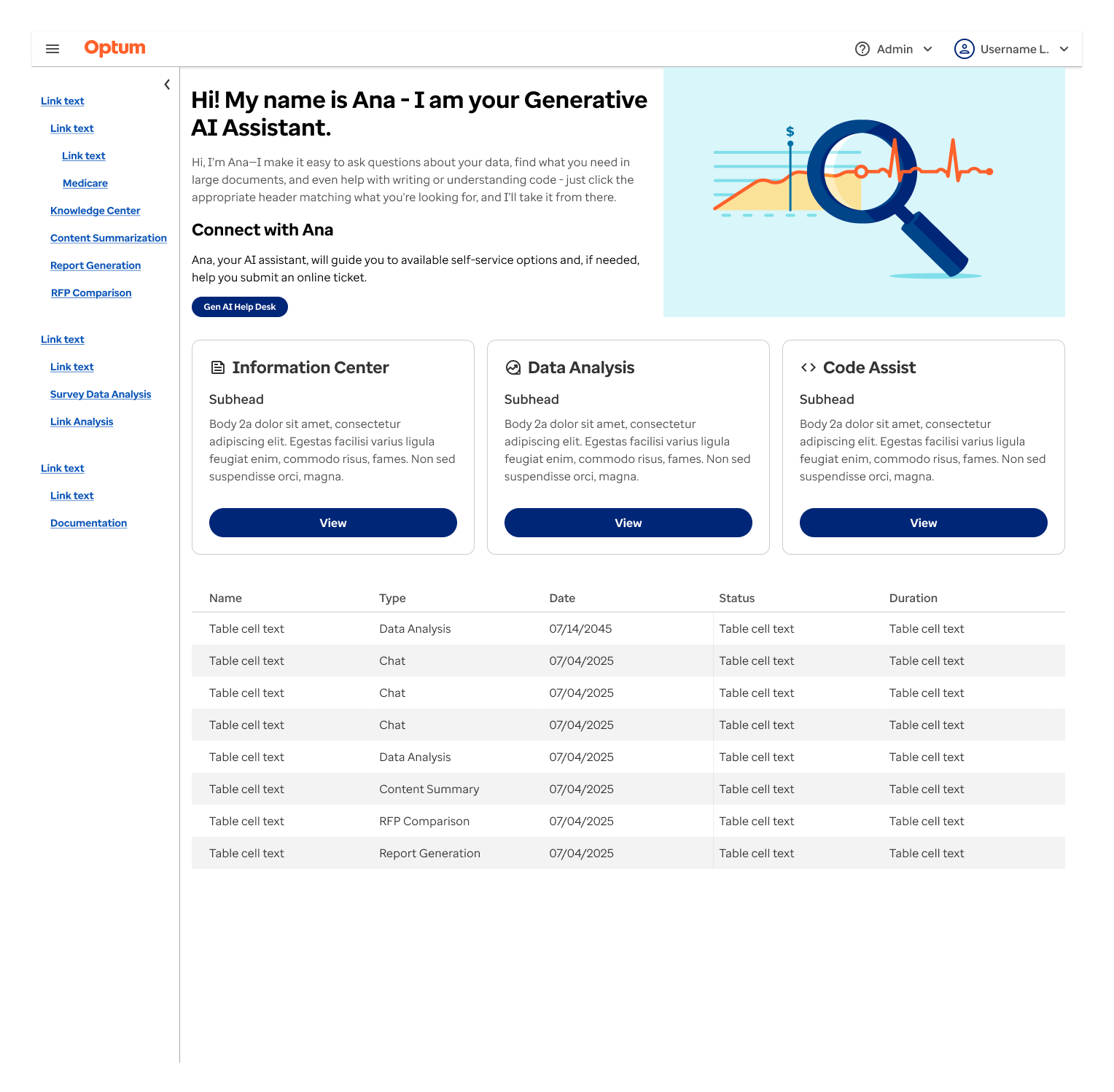
This was my initial wireframe for the main page of this application. This incorporated a number of the original elements that were present, such as the introduction hero, magnifying glass image, and cards for different components. The idea was that we were bridging the gap from what was already built and iterating from there. The navigation menu system was changed from a typical website "ribbon" with dropdown categories to a side tray with all the sections shown. This helped to decrease searching for areas users wanted to work with while also increasing visibility.
There is also the addition of the history table for each interaction. This made it quicker and easier for users to jump back in where they left off. It shows each process type, when it was run, status, and how long it took. This way users could connect what they are working on.
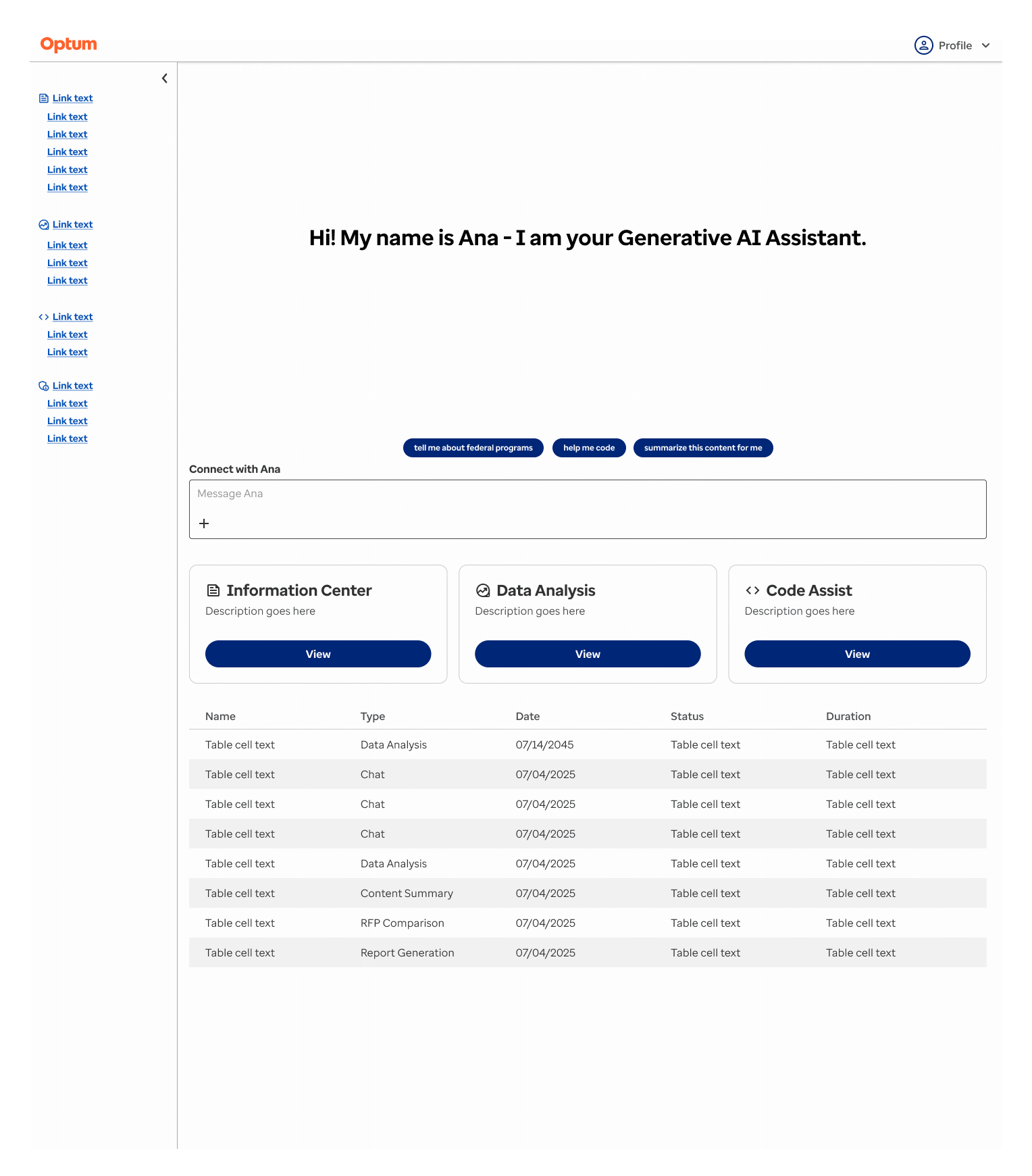
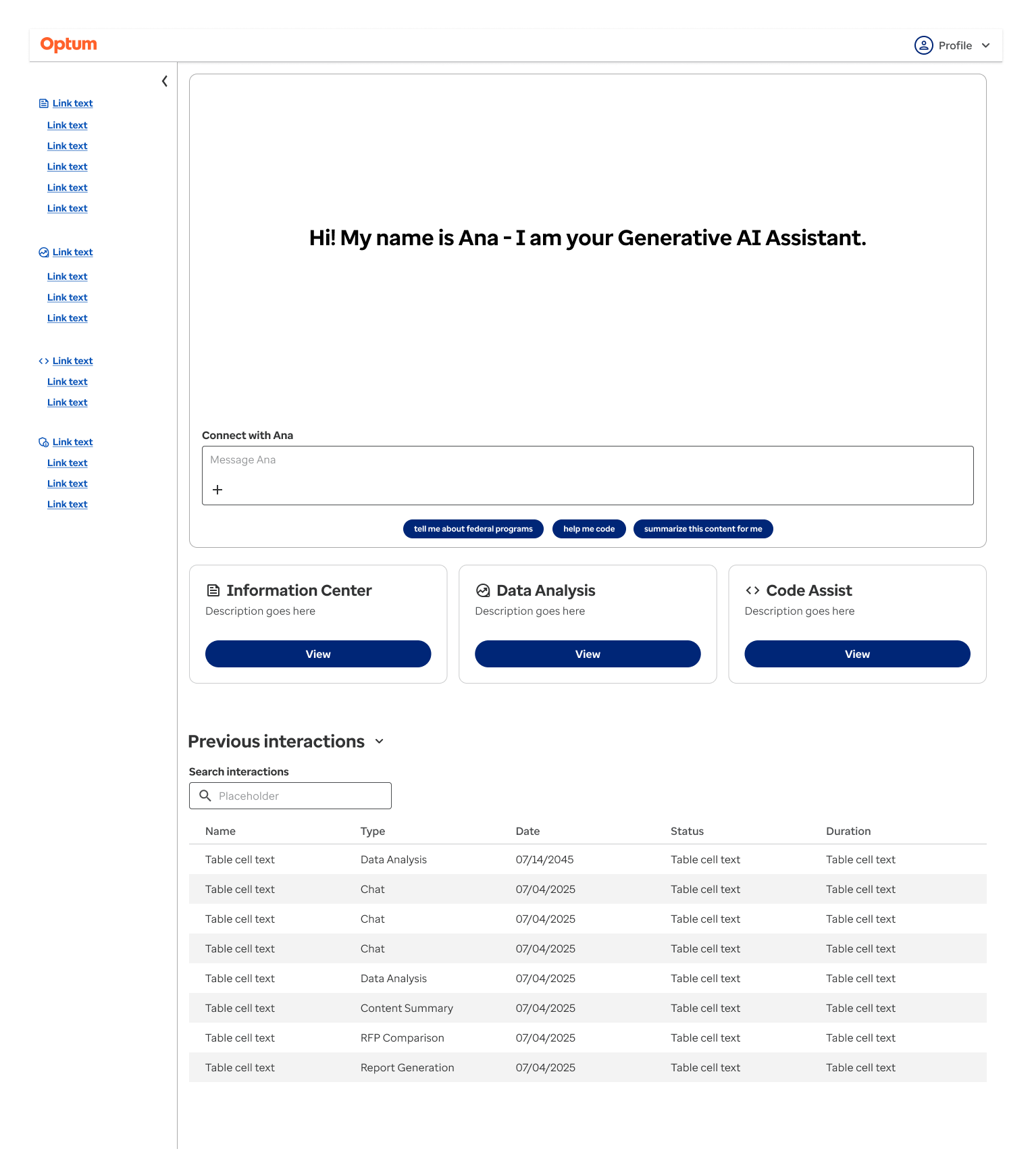
Usability testing showed that the hero section was unnecessary and confusing. It felt more "marketing" and less of an actual software. Removing that we integrated GenAI chat functionality directly to the home page, and started integrating nudges in the form of small blue buttons in the chat area to get the user to interact with the system. This helped solve the blank canvas problem and task paralysis, with users not knowing how to interact with the system.
Further testing showed that a search feature would be necessary for the previous interactions table. Nudge buttons were moved below the chat box so users felt they were more part of the actual chat, and not taking users to other sections. Further refinement here would be to make additional search and filtering available for the previous interactions.
The chat being such a primary component of the application, it was necessary to fully explore and develop how users would interact with it. Prior to my involvement, the chat was simple prompt and response. This was acceptable for testing, however research suggested that more robust features were necessary. The challenge here was that it needed to integrate across the entire application, not just in one section.
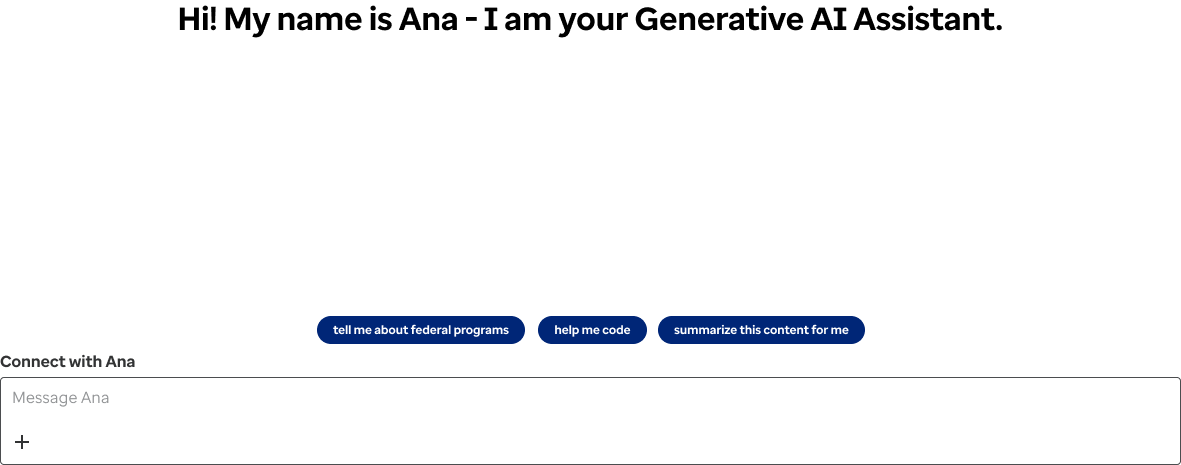
This is the initial basic wireframe for the chatbot. No interactions have been applied. The idea is that this would be able to sit within any component within the application. Here we needed to establish basic pattern and features.
Nudges are present to take care of the blank canvas problem. There is the prompt box for the user to enter a prompt, and a small "+" icon, allowing users to attach documents. This could potentially be used to incorporate additional features as well.
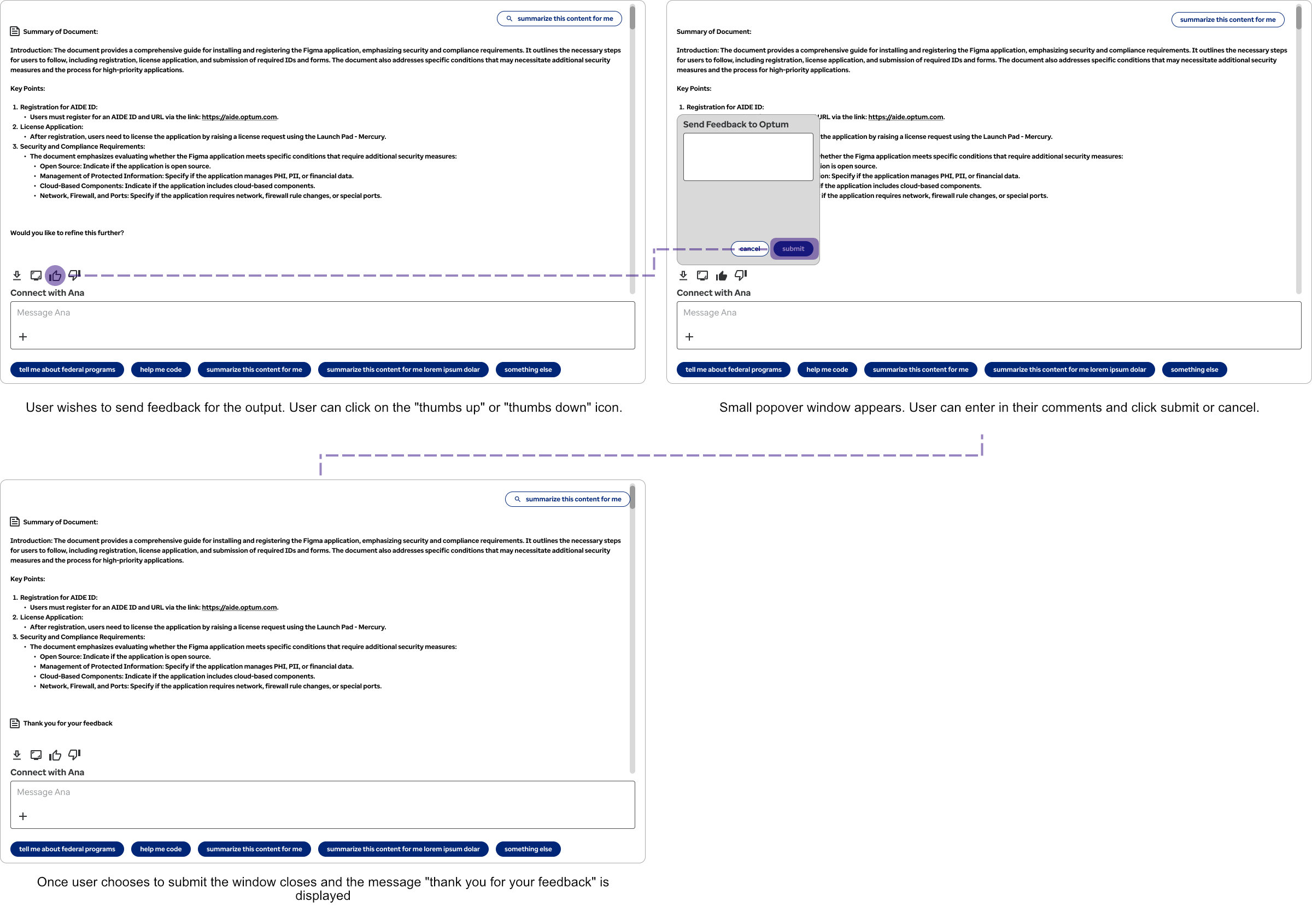
Feedback options were a necessary component for the chatbot so that the models could be better trained and engineers could understand if there were any potential problems with the chatbot outputs. This is especially helpful for proprietary internal models or secure models trained on sensitive data such as this.
While this looks as if it is a fairly simple user interaction, it was necessary to strip out overly complex star ratings. This was an ambiguous approach, eg what is the difference between 3 and 5 stars, and did not give the engineers useful feedback. Users would also skip over this if there were too many steps. So we distilled this down to a simple two-step process. This helped to increase user participation and get more useful direct feedback the engineering team could use.
The basic premise is a positive and negative feedback rating. The user then adds in their comments and submits. There are also elements nearby to either screen capture or to download the chat history.
Another vital part of the chatbot was it being able to cite where it was getting information from. While allowing users to rate outputs was helpful in AI training, it was less useful if users could not tell whether it was generating wrong information. Making it so users could trace the source data and reasoning the GenAI Assistant used in a way that's transparent and auditable was integral to the work data scientists and federal employees were doing.
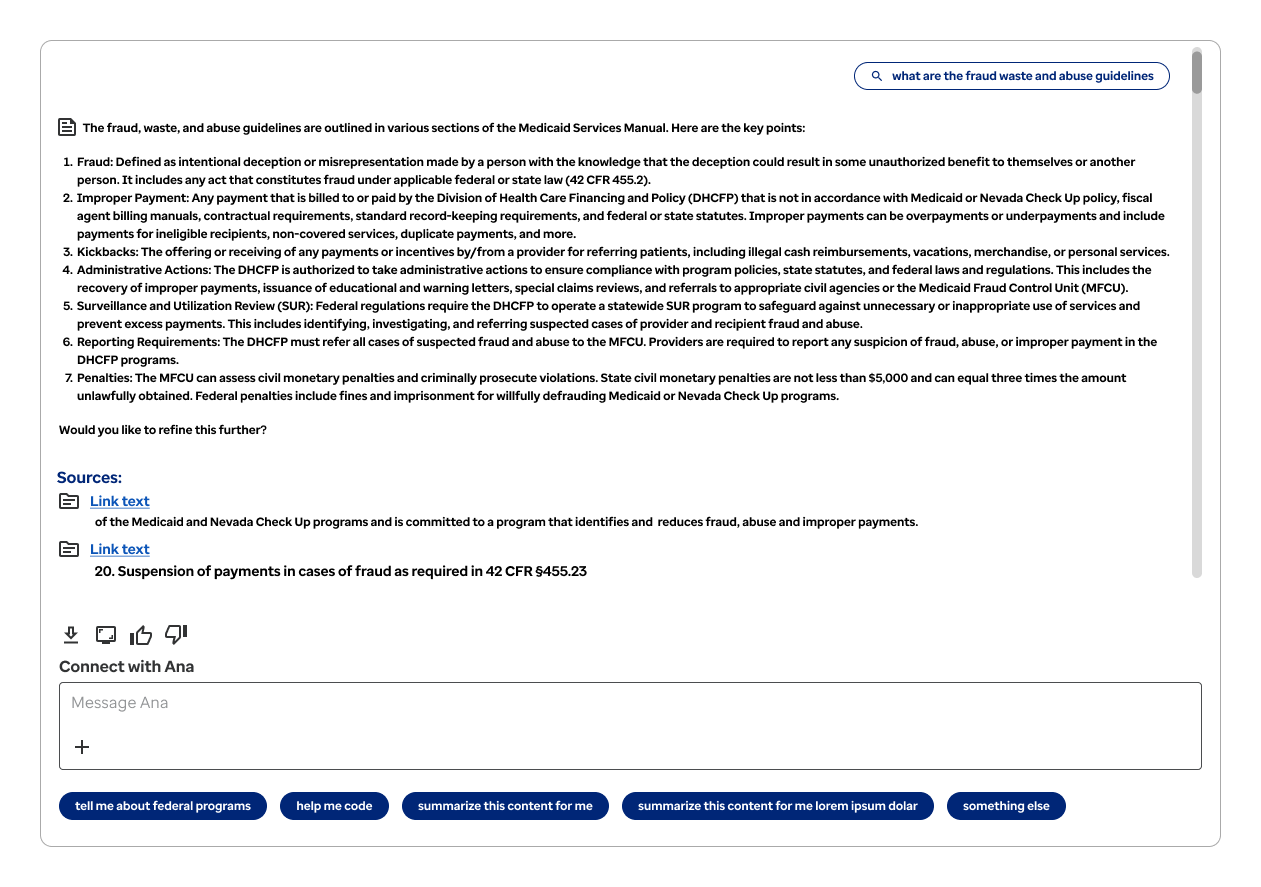
Here is the first output from the chat assistant. At the end, we ask the user if they would like to refine it further, which does help to prompt them to further investigate with the chatbot and refine the outputs. Directly below this though we show the sources for the information that was presented. We show both the initial citation text and a direct link to the document.
Multiple sources are displayed separately. This way, users are less confused as to what information the system is pulling from. "Link text" is a placeholder here. In the finalized version we would be outputting the document name, e.g. "Medicaid Services Manual".
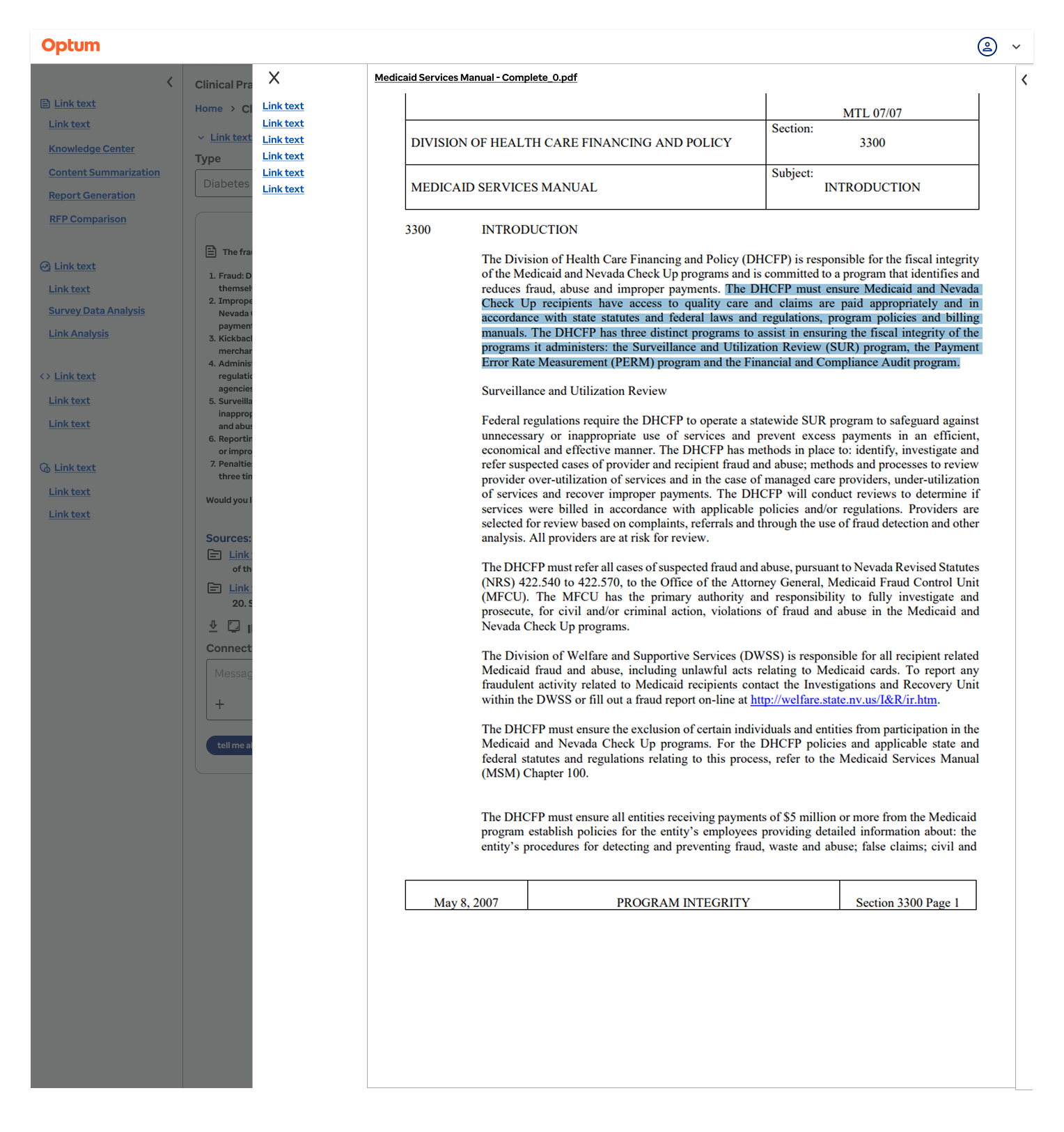
When clicking on one of the source links, a panel slides out from the right that displays the linked document. This works much like a modal which can be dismissed by clicking the "X" in the upper right of the panel.
A menu tray is on the left side of the panel, linking to each citation within the document. This makes it easier for the user to navigate to each citation instead of forcing them to page through these documents, some of which had hundreds of pages. Each citation is highlighted in blue, further reducing cognitive load on the end user.
Making it easier for users to cite their sources helped to speed up processes. The GenAI Assistant could search documents in seconds and show citations, but the real value came from citing direct documents in work outputs. This helped to reduce errors which would have resulted in costly corrections, not something that users could afford with the nature of the time sensitive work they were doing.
AI presents itself as being powerful and a way to increase productivity, but if users aren't able to intuitively interact with it this lends to task paralysis. This presents unique problems with UX design, and trying to better understand how users interact not only with the overall software, but also the chatbot interactions themselves.
Most importantly, this project required developing brand new patterns that were not present. This required me doing a large amount of outside research along with interacting with numerous GenAI applications to better understand how they worked and what problems they posed, along with identifying pain points that were inherent to these systems. Reviewed ChatGPT, Copilot, and Deepseek, identifying gaps with citations of work and how they tackled painpoints such as task paralysis.
If I could redo this project, I would push for end-user interviews earlier. We relied too long on stakeholder proxies.